
Build the estimate on the same RO the bay will work
Jobs, labor, and parts in one login — canned templates and PartsTech punchout land on the ticket, then Pro text or email approve with e-sign — without a second estimate system.
On Pro. Full RO workspace with canned jobs and PartsTech punchout. Parts and labor markup matrices are on Elite. Licensed labor data stays on Elite — we do not name a labor-data vendor.
RO #1047 · 2018 Honda CR-V EX · Brake pads R&R + ceramic pads · Alex Rivera
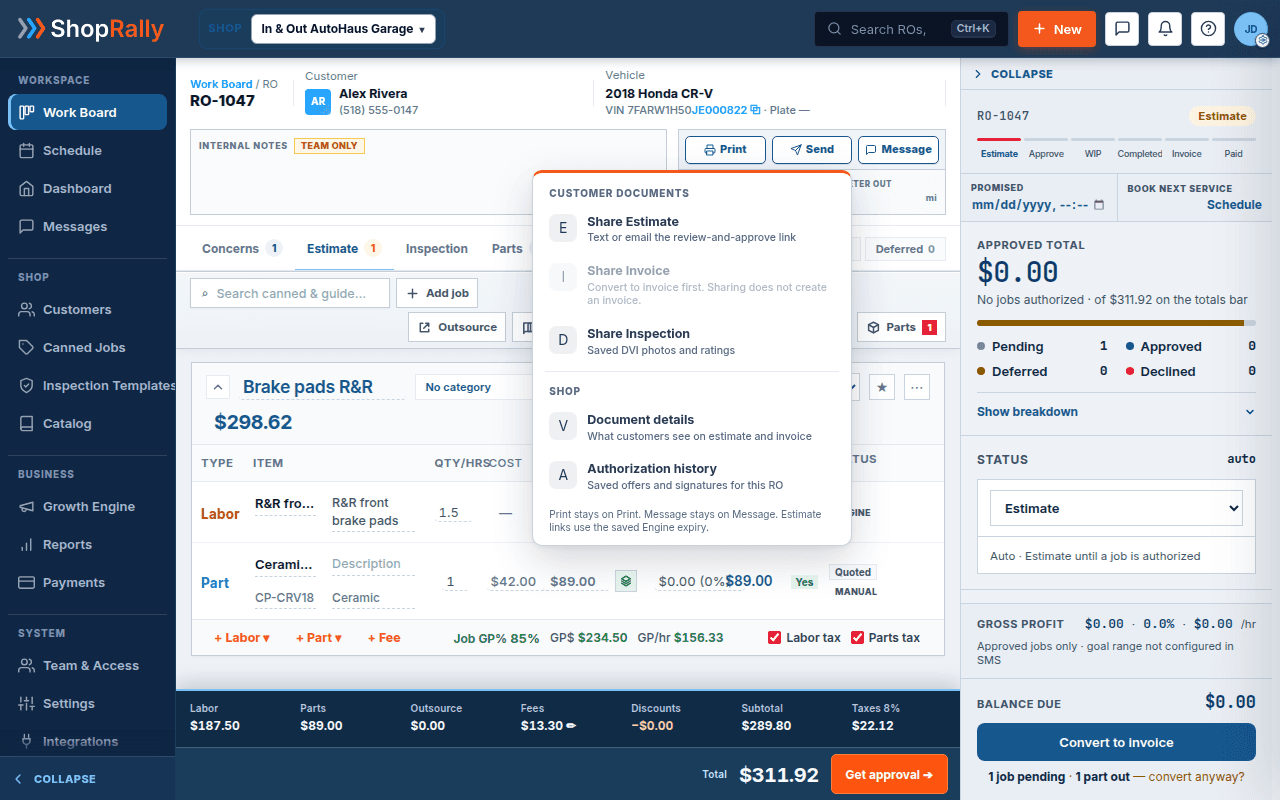
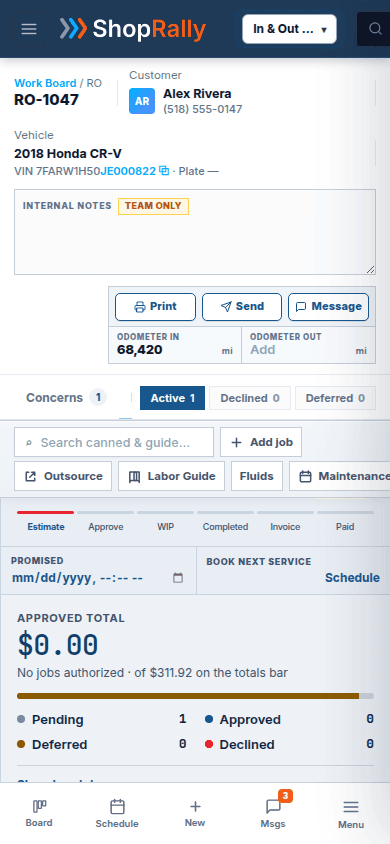
Continuity: Batch A RO #1047 / CR-V · canned Brake pads R&R · PartsTech ceramic pads. Illustrative $ labeled story chrome.
Operate
From blank RO to signed estimate — one ticket
Not three generic steps. A four-beat chain the counter already runs — on one repair order.
1
Build on the RO
Labor and parts sit on the same estimate. Advisors are not splitting the ticket across a quoting tool and a separate shop OS.
2
Drop canned work
Reusable shop templates keep brake pads, flushes, and other weekly jobs from being rebuilt from scratch. Pro is your shop’s own library.
3
PartsTech punchout
Pull parts through PartsTech / Nexpart into the same RO lines. That punchout is on Pro.
4
Send for Pro approve
Share the digital estimate: text or email to approve with e-sign. This is not a two-way SMS inbox.
1. Build on the RO. Labor and parts sit on the same estimate. Advisors are not splitting the ticket across a quoting tool and a separate shop OS. What the customer will see later is what the bay will work — same record.
2. Drop canned work. Reusable shop templates keep brake pads, flushes, and other weekly jobs from being rebuilt from scratch. Pro is your shop’s own library. Licensed labor data and service intervals stay on Elite. We do not name a labor-data vendor on this site. We also do not invent a magic map that turns inspection findings into canned jobs automatically — that is not a claim on this page.
3. PartsTech punchout. Pull parts through PartsTech / Nexpart into the same RO lines. That punchout is on Pro. This page will not invent an ALLDATA, WorldPac, RepairLink, or TireHub catalog wall — partner depth lives on the PartsTech feature page.
4. Send for Pro approve. Share the digital estimate: text or email to approve with e-sign. The same RO is what the job board, the inspection, and the invoice see. This is not a two-way SMS inbox. Two-way texting is Elite on its own page.
Contrast
Stop rebuilding the ticket in three places
Before
The quote lives in one tool. Parts live in another tab. Status lives on the whiteboard. Canned work lives in someone’s head. Approval is a phone tag that never quite matches the lines on the ticket.
After
One Estimates & RO workspace on Pro. Build the job, drop a canned template, punch out PartsTech lines, then send Pro text or email approve with e-sign. The job board card opens this same RO. The bay is not working a different document than the one the customer signed.
Before
- Quote — other tool
- Parts — another tab
- Status — whiteboard
- Canned — in someone's head
- Approve — phone tag ≠ ticket
After
One RO · Share Estimate
Dense workspace on RO #1047. Labor + ceramic pads on the same ticket. Pro text or email the review-and-approve link — not a two-way inbox.
Honest packaging
What’s on Pro vs Elite (this page only)
Pro includes the full estimates workspace, your canned jobs library, PartsTech / Nexpart punchout, and text or email approve with e-sign.
Elite adds parts and labor markup matrices, plus licensed labor data (still no vendor name on the marketing site). Ultra inherits those Elite capabilities. Two-way SMS is not unlocked by this page — see the Two-way SMS feature page for Elite inbox + templates; Ultra inherits that conversation product there, not as estimate auto-pilot here.
We will not claim Ultra AI that writes or auto-approves estimates.
| Capability | Pro | Elite | Ultra |
|---|---|---|---|
| Estimates & RO workspace | Yes | Yes | Yes |
| Shop canned jobs library | Yes | Yes | Yes |
| PartsTech / Nexpart punchout | Yes | Yes | Yes |
| Text/email approve + e-sign | Yes | Yes | Yes |
| Parts/labor markup matrices | — | Yes | Yes (inherits) |
| Licensed labor data (no vendor name) | — | Yes | Yes (inherits) |
| Two-way SMS inbox | No (approve link only) | Yes — see /features/two-way-sms | Yes — inherits Elite (see /features/two-way-sms) |
Works with
Works with the board and the approve moment
Job board. The card is this repair order. When the customer approves, the work can move to WIP on the board — same ticket, not a sticky rewrite.
Email & SMS approvals. That page owns the customer phone moment: review, Approve, Sign & approve. This page owns building the lines they are asked to sign.
PartsTech owns punchout depth. Canned jobs owns the library-only story. Digital estimates (Delight) owns the paperless customer view of the ticket — pair Approvals; do not duplicate that phone hero here.
Packaging
Questions about this feature
Is the RO workspace only on Elite?
Is sending the estimate two-way texting?
Do you include licensed labor data on Pro?
How is this different from Digital estimates?
Can I punch out parts without leaving the RO?
Does an inspection finding auto-build a canned job?
Works next to
Pairs with
- On ProJob boardThe card is this repair order. When the customer approves, the work can move to WIP — same ticket.Open
- On ProEmail & SMS approvalsThat page owns the customer phone moment: review, Approve, Sign & approve. This page owns building the lines they sign.Open
Also: PartsTech — punchout depth on Pro. Digital estimates owns the paperless customer view.
Reserve a founding seat
Founding shops get Pro, Elite, or Ultra at launch. The RO workspace is already on Pro — see plans if you want packaging in one place.
Launching Q4 2026 · no card · we'll invite you at launch
Built by a shop owner · Launching Q4 2026